Run your whole restaurant from one QR code.
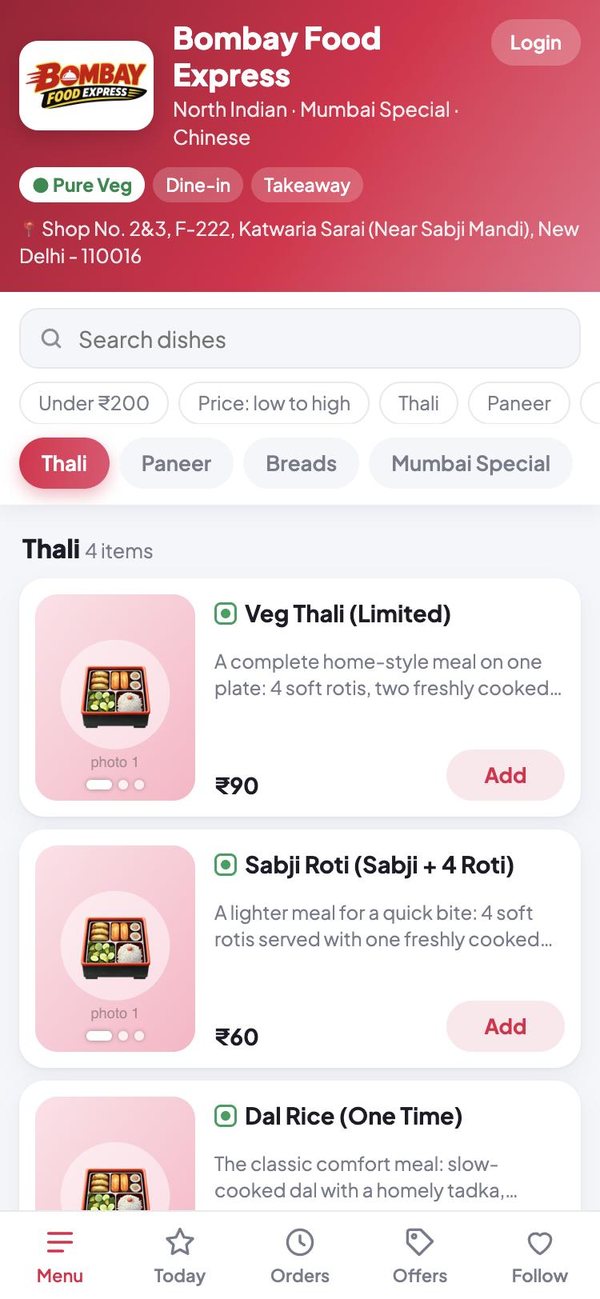
Customers scan, see your menu and order from their own phone. You get the orders, a kitchen screen, staff attendance and salary, and your accounts with profit and loss, all on the phones you already have.
- No machine to buy
- Nothing to download from an app store
- Ready in minutes
From the first order to the month's profit
Each part works on its own, and they all share the same records, so nothing is entered twice.
QR menu and ordering
A menu with photos, prices and veg marks. Customers order and pay from their own phone, table by table.
Orders and kitchen screen
Orders reach the counter and the kitchen at once. Mark them cooking, ready and served.
Menu you change yourself
Add dishes, sizes and photos, switch a dish off when it runs out, and set today's special.
Offers and discounts
Offers customers claim, a lucky discount, a budget shared out at random, and discounts by how much a customer has spent.
Staff and attendance
Mark present, half day, absent or leave, by day or by work slot. Staff suggest, the manager approves.
Salary without the maths
Salary builds up day by day from attendance. Record payments and advances, and each person sees their own.
Accounts and profit
Sales, purchases, vendors, rent and bills. See the day's and the month's profit and loss.
UPI and platform settlements
Track what each UPI app, Zomato and Swiggy owes you, what reached the bank, and what was deducted.
The right app for each person
Each one installs on its own and keeps its own sign-in, so a waiter's phone never shows the owner's accounts.
 For customers
QRThali
- Scan the table's QR code
- See the menu and today's special
- Order, pay by UPI, rate dishes
 For owners and managers
QRThali Partner
- Orders and tracking
- Menu, offers and QR codes
- Staff, salary and accounts
 For staff
QRThali Staff
- Their own attendance calendar
- Salary earned, paid and due
- Details and health papers
 For the kitchen
QRThali Kitchen
- Big, clear order cards
- Table number on every order
- One tap for ready
Open for orders in four steps
Register
Sign in with Google and enter your restaurant's name and area. You become its owner.
Add your menu
Put in your dishes and prices, your UPI ID and your logo from the Partner app.
Print the QR codes
Print one card for every table. Each carries its table number.
Take orders
Customers scan and order. You confirm the payment and the kitchen starts cooking.
Know what you really made
Sales are easy to see. Profit is what is left after food cost, rent, salaries and what the apps keep.
- Walk-in, Zomato and Swiggy sales, each on its own
- Vendor bills, payments and what you still owe
- Rent, electricity and salaries spread over the days of the month
- What every UPI app deducted before it reached your bank
Attendance and salary everyone agrees on
The owner and the staff member look at the same calendar, so there is nothing to argue about at the end of the month.
- Tap a date to mark present, half day, absent or leave
- Morning and evening slots, marked one by one
- Staff note their own days; the manager approves
- Medical tests, FSSAI and GST papers with reminders
Good to know before you start
Do my customers have to install an app?
No. They scan the QR code on the table and the menu opens in their phone's browser. They can add it to their home screen if they order often.
Do I need a billing machine, tablet or printer?
No. Everything runs on ordinary phones. A tablet or a spare phone in the kitchen is handy for the kitchen screen, and you need any printer once, to print the table QR codes.
Where does the customer's money go?
Straight to your own UPI ID. QRThali opens the customer's UPI app with your ID and the amount filled in; it does not hold or pass on your money.
How do my staff join?
You add each person in the Partner app with their Gmail, or they open your staff link, sign in and ask to be added. You approve them, and they see only their own attendance and salary.
Who can see my accounts?
Only you, and the people you add as an admin. Staff, the kitchen and customers cannot open them.
Can I use only part of it?
Yes. Start with the QR menu alone, and switch on the kitchen screen, staff or accounts when you want them.
Put your restaurant on QRThali today
Register, add your dishes and print the QR codes for your tables. Your first order can come in this evening.